
How to track time on construction sites (simply, without spreadsheets)
Construction time tracking is one of the messiest operational topics for building companies. Hours end up on paper, in texts, or in spreadsheets — which means errors, disputes, and weak audit trails. Here is a simpler approach that also gives your team an everyday tool (not “only for leave”).
What it looks like in the real world
- No single source of truth for hours — each supervisor keeps their own notes.
- Overtime and field work are hard to reconcile fairly.
- Weak visibility into who was on site and when.
- Leave chaos — nobody knows who can cover the shift.
The simplest shift: one system instead of five tools
Instead of spreadsheets and scattered messages, use one system for time tracking and day-to-day operations. In Planopia, people log hours or use their phone on site, while the office sees calendars, reports, and schedules in one place.
The same workspace supports everyday work:
- time tracking and overtime with a clear monthly view;
- schedules and leave — fewer “who is on today?” calls;
- Task boards — jobs, phases, and status for office and crews;
- team chat — decisions tied to a site instead of random threads.
Planopia for construction companies — a short overview with features and FAQs for construction teams.
What automation changes
- Less admin time — fewer copy-paste marathons.
- Lower error risk when hours are summed consistently.
- PDF and Excel exports when you need a client-ready pack.
- Easier overtime control with a transparent calendar.
AI in practice (Planopia assistant)
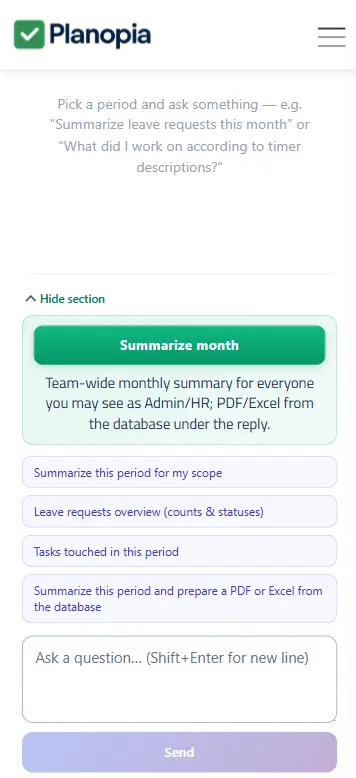
Modern tools can help analyze data you already collect. Planopia’s AI assistant can support month summaries, spotting overtime patterns, and drafting report text — with less manual stitching across views.
Why “an app for every day” beats “only time tracking”
Teams adopt tools that sit where work already happens. When tasks and chat live next to time tracking, data stays fresher and the team jumps between fewer apps. That is why Planopia combines boards and chat with schedules and time tracking.
Foreman time tracking when not everyone has an app account
On many sites not every crew member logs in — you still need crew payroll and construction time reporting. In Planopia a foreman or manager adds no-access workers and maintains their timesheets (including on the free plan).
- Crew settlement without forcing every worker to install and log in.
- Construction worker timesheets in a monthly calendar, with overtime and PDF/Excel exports.
- Schedules and leave on behalf of the crew — on paid plans when you need full HR on site.
Planopia for construction companies — full feature overview and FAQ.
FAQ (construction)
Does every employee need access to the app?
No. A foreman or manager can add no-access workers and maintain their timesheets — ideal for crew time tracking on site. Free plan: timesheets; schedules and leave on their behalf — on paid plans.
Can crews log time from a phone?
Yes — Planopia runs as a browser PWA. Foremen can enter hours on site or use the AI assistant for summaries.
Is Planopia only for leave?
No — time tracking, schedules, boards, chat, and AI in one product. Construction teams especially value crew timesheets without universal logins.
Planopia in practice — desktop and mobile screenshots
Tap a thumbnail to enlarge.
Site and office under control?
30 days full access; then free time tracking (5 accounts) or a paid plan — leave, schedules, chat, AI.
Create your team — 30 days freeVideo tutorials
See Planopia in action
Short clips recorded inside the app — for example, how to add hours in the time log. A great first step right after you create a team.